One thing first: we make PostAnything, so it's first on this list, and we think it's the best choice for most people leaving Buffer. It's the cheapest way to post to all 9 platforms, it writes a separate caption for every platform from one link, video or document, and it's the easiest of these tools to use. We've still been straight about where it falls short, and about when staying on Buffer makes more sense.
Quick picks
- PostAnything: best overall and easiest to use, especially for one brand on all 9 platforms, with a separate caption written for each
- Hootsuite: best for larger teams that need an inbox, listening and approvals
- Later: best for visual, Instagram-first brands
- Publer: best low-cost scheduler with a free plan
- SocialBee: best for recycling evergreen content
- Metricool: best free plan with built-in analytics
One brand on all 9 platforms, per month
- Facebook Yours to write$6
- Instagram Yours to write$6
- LinkedIn Yours to write$6
- Pinterest Yours to write$6
- X Yours to write$6
- Threads Yours to write$6
- Bluesky Yours to write$6
- TikTok Yours to write$6
- YouTube Yours to write$6
- Facebook Written for youincl.
- Instagram Written for youincl.
- LinkedIn Written for youincl.
- Pinterest Written for youincl.
- X Written for youincl.
- Threads Written for youincl.
- Bluesky Written for youincl.
- TikTok Written for youincl.
- YouTube Written for youincl.
Monthly billing, prices at the time of writing. Buffer's AI Assistant can help you write each caption. TikTok and YouTube join a PostAnything post when it has a video.
Why people look for Buffer alternatives
Per-channel pricing adds up. Buffer charges for each connected account, which it calls a channel. Essentials is $6 per channel a month on monthly billing ($5 billed yearly), and Team is $12 ($10 yearly). One brand on all 9 platforms is 9 channels: $54 a month on Essentials, or $108 on Team. That's fair for two or three accounts, but it stings when every new platform raises the bill.
Every platform still needs its own caption. A LinkedIn update, an Instagram caption and a short X post are different jobs. Buffer's AI Assistant helps: it can tailor a post for each network, rewrite tone and length, and summarise long content. Some tools below go a step further and start from your source material, so you hand over a link or a video and get the captions back.
Others leave because they need more team tooling, like social listening. Different reasons point to different tools.
Is Buffer worth it?
For plenty of people, yes. Buffer's free plan covers 3 channels with up to 10 scheduled posts per channel at a time, and includes the AI Assistant. Stay on Buffer if:
- You post to one to three accounts, and the free plan or a few Essentials channels cover you.
- You're a team that needs approval workflows, unlimited users or a community inbox for replying to comments.
- You rely on first-comment scheduling, its mobile apps or browser extension, or you post to Google Business Profile, Mastodon or Substack.
It's weaker value when one person or small business wants to be everywhere: 9 channels on Essentials cost $54 a month on monthly billing, and you're still writing every caption. Check the current rates on Buffer's pricing page.
The 6 best Buffer alternatives, reviewed
Prices are at the time of writing, from each tool's own pricing page, so check the linked page before you buy.
1. PostAnything: best overall and easiest to use, for posting to all 9 platforms from one source
Who it suits: Solo creators, freelancers and small businesses that want one brand everywhere without writing nine captions.
Price: Basic is $15 a month for 30 posts, and each one goes out to every platform you've connected while counting once. Pro is $29 a month for 300 posts on the same terms, and adds Bulk Schedule and Audio Note. Annual billing saves 20%. See PostAnything's plans and pricing.
Free plan: No. Instead, new accounts get 5 free posts so you can try it out before you subscribe. Each one publishes to all your platforms, with every feature, no credit card and no time limit.
AI captions: Yes. One click of Generate writes a separate caption for each platform, in your brand voice.
Ease of use: The easiest of the seven. Once your accounts are connected, a post takes three steps: paste a link (or add a photo, video or document), click Generate, and pick a time. There's no composer to fill in for each network, no content categories to set up and no AI credits to ration.
Most schedulers start with a blank composer. PostAnything, an AI social media manager as well as a scheduler, starts from what you already have: an idea, a photo or video, a link, a YouTube video, a document or a voice recording. Hashtags and emojis only go where they suit the platform. Photos and videos are resized for you: square for the Instagram feed and vertical for TikTok and Reels, while YouTube keeps the video's shape: a vertical clip becomes a Short, a landscape one a regular video.
Example: one blog post, nine platforms
Say you run a bakery and you've just published "5 reasons your sourdough isn't rising".
- Open New Post and pick the URL tile.
- Paste the article's link. The Link to add to the post field fills in by itself.
- Click Generate.
- Optional In the Post Image card, pick the article's photo in the image carousel. Skip this and the first photo is used.
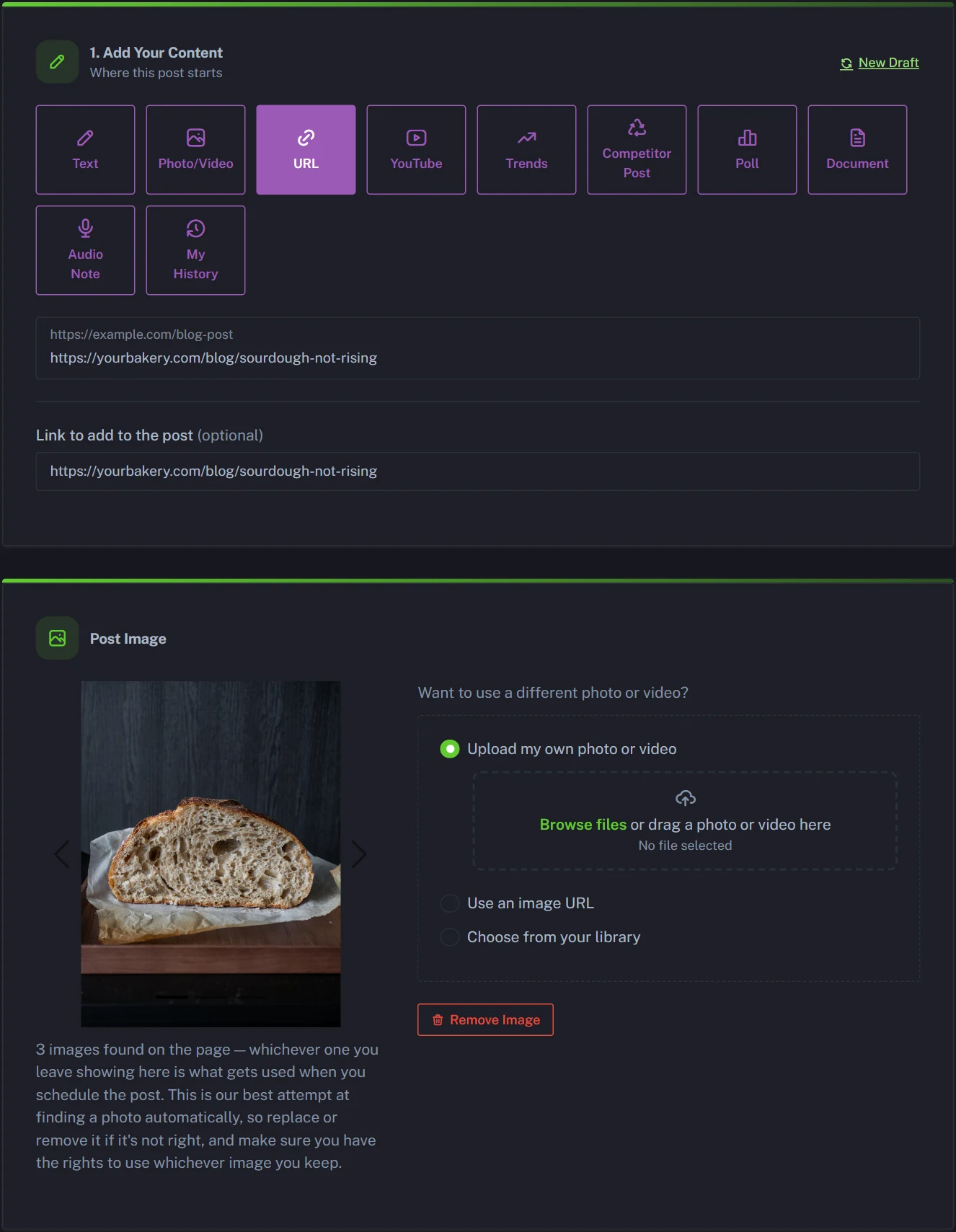
In Step 2, every platform gets its own caption card. The article's photo covers seven of them. To bring in TikTok and YouTube too, we swapped it for a short vertical clip of a loaf rising, using Upload my own photo or video in the Post Image card. Here's what all nine got:
Is your sourdough coming out flat? You're not alone, and it's almost always one of five fixable things. We've rounded them all up, from a sluggish starter to proofing time, so your next loaf rises the way it should. https://yourbakery.com/blog/sourdough-not-rising
Flat loaf again? 😩 It's almost always one of these five things, and every one is fixable. Starter, temperature, timing… we break them all down on the blog 🍞 #sourdough #sourdoughbaking #homebaking #breadmaking https://yourbakery.com/blog/sourdough-not-rising
Most flat sourdough loaves come down to one of five fixable problems, and a weak starter is only one of them. We've written up how to spot each cause and what to change on your next bake. https://yourbakery.com/blog/sourdough-not-rising
Sourdough not rising? Five common causes of a flat, dense loaf and how to fix each one, from starter strength to dough temperature. Save this for your next bake. https://yourbakery.com/blog/sourdough-not-rising
XSourdough not rising? Five usual suspects, five fixes. Your starter is only one of them. https://yourbakery.com/blog/sourdough-not-rising
ThreadsHonest question: how many flat sourdough loaves have you baked this year? 🙋 We rounded up the five usual culprits and how to fix each one. #sourdough https://yourbakery.com/blog/sourdough-not-rising
BlueskyDense, flat sourdough is nearly always one of five things. Here's how to spot each one, and what to change next bake 🍞 https://yourbakery.com/blog/sourdough-not-rising
TikTokWatch it rise 👀🍞 If yours doesn't, it's one of these 5 things, and every one is fixable. Full breakdown on our blog. #sourdough #sourdoughtok #breadtok #baking https://yourbakery.com/blog/sourdough-not-rising
YouTubeSourdough not rising? Here's what a healthy rise looks like, and the five most common reasons a loaf stays flat. The fixes are all on our blog. #Shorts #sourdough https://yourbakery.com/blog/sourdough-not-rising
Keep the photo instead and TikTok and YouTube simply sit that post out, while the other seven still get it. Here's the full walkthrough for turning a blog post into social media posts, and for posting one video to every platform.
Honest drawback: It's built for writing and publishing, not running a team. There's no free-forever plan, a monthly post allowance rather than unlimited posts, no team seats or approval workflow, no comment inbox, no first-comment scheduling, and no mobile app or browser extension. It doesn't post to Google Business Profile, Mastodon or Substack, and each post carries one photo or video, so no Instagram carousels or Stories.
2. Hootsuite: best for larger teams that need an inbox and listening
Who it suits: Marketing teams that answer customers on social, track mentions and report to managers or clients.
Price: Standard is $99 per user a month, billed annually, for up to 10 social accounts, with an inbox, listening and reporting included. Professional ($199) adds unlimited accounts and Advanced ($399) adds approvals. See Hootsuite's plans.
Free plan: No, but there's a 14-day free trial with no credit card.
AI captions: Yes. Every plan includes an AI assistant that can draft posts and images.
Honest drawback: You pay per user, so a team of three costs three times as much, and approvals only arrive on Advanced. If you came looking for a Buffer and Hootsuite alternative because both cost more than you'd like, the table below is the place to start.
3. Later: best for visual, Instagram-first brands
Who it suits: Creators and brands whose feed looks matter most, especially on Instagram and TikTok.
Price: Starter is $18.75 a month billed yearly for one profile each on Instagram, Facebook, Threads, Pinterest, TikTok, LinkedIn, YouTube and Snapchat, with 30 posts per profile a month. Growth ($37.50 billed yearly) adds an inbox and approvals. See Later's pricing.
Free plan: No. There's a 14-day free trial.
AI captions: Yes, on credits. Starter includes 5 a month, and one credit writes one caption. Its visual planner and link-in-bio page suit anyone who plans their grid carefully.
Honest drawback: No X or Bluesky, so it covers 7 of the 9 platforms here, and 5 AI credits a month won't go far.
4. Publer: best low-cost scheduler with a free plan
Who it suits: Solo users and small teams who want lots of scheduling features for little money and are happy to write most captions themselves.
Price: Professional is $5 a month for one account on monthly billing, and $4 per account from three accounts on, so 9 accounts comes to $36. Business is $10 for one account, or $63 for 9, and adds unlimited AI, analytics and post recycling. See Publer's plans.
Free plan: Yes: 3 social accounts (not X), with 10 scheduled posts per account at a time.
AI captions: Yes, with unlimited AI prompts on Business. Paid plans add first comments, a browser extension and a mobile app.
Honest drawback: It's still per-account pricing, so the bill climbs with every platform, and X needs a paid plan.
5. SocialBee: best for recycling evergreen content
Who it suits: Small businesses with a library of evergreen posts they want to keep in rotation.
Price: Bootstrap is $29 a month on monthly billing for 5 profiles, and extra profiles come in sets of 5 for $15 a month, so 9 platforms costs $44. Accelerate is $49 for 10 profiles. See SocialBee's pricing.
Free plan: No. There's a 14-day free trial.
AI captions: Yes, unlimited on every plan, and it can tailor a post for each profile. Content categories rotate your posts on a schedule, so a good one keeps working.
Honest drawback: Bootstrap includes only 5 profiles, so all 9 platforms means buying an extra set. CSV uploads and approvals start on Accelerate, and the category system takes some setting up.
6. Metricool: best free plan with built-in analytics
Who it suits: People who care about the numbers as much as the scheduling, and anyone who wants to start free.
Price: Starter is $25 a month on monthly billing ($20 yearly) for up to 5 brands, each with one profile per network. X is an add-on at $10 a month per account, so one brand on all 9 platforms costs $35. See Metricool's pricing.
Free plan: Yes: 1 brand and 20 posts a month, with 30 days of analytics, but no LinkedIn or X.
AI captions: Yes, on credits: 5 per brand a month on Free and 20 on Starter.
Honest drawback: X costs extra on every paid plan, and AI help is rationed by credits.
What about Sprout Social?
Sprout Social is the premium pick for teams that need enterprise-grade reporting, listening and customer care, but its main plans run $199 to $399 per seat a month (Essentials starts at $79 per seat billed annually, for 5 profiles), so it's rarely the answer if price is why you're leaving Buffer. See Sprout Social's pricing.
Buffer alternatives compared side by side
"Price to post to all your platforms" means one account on each of the 9 platforms (or as many as the tool supports), on monthly billing unless noted.
| Tool | Price to post to all your platforms | Free plan | AI captions | Supported platforms |
|---|---|---|---|---|
| PostAnything | $15/mo (Basic: 30 posts a month, each sent to every connected platform) | No (5 free posts to try it before subscribing) | Yes, a separate caption per platform from one source | All 9 |
| Buffer | $54/mo (Essentials, 9 × $6) | Yes (3 channels) | Yes | All 9, plus Google Business Profile, Mastodon, Substack |
| Hootsuite | $99 per user/mo, billed annually (Standard, up to 10 accounts) | No (14-day trial) | Yes | All 9 |
| Later | $18.75/mo, billed yearly (Starter) | No (14-day trial) | Yes (5 credits a month on Starter) | 7 of the 9 (no X or Bluesky), plus Snapchat |
| Publer | $36/mo (Professional, 9 accounts) | Yes (3 accounts, no X) | Yes (unlimited on Business) | All 9, plus Google Business Profile, Mastodon, Telegram, WordPress |
| SocialBee | $44/mo (Bootstrap plus 5 extra profiles) | No (14-day trial) | Yes (unlimited) | All 9, plus Google Business Profile |
| Metricool | $35/mo (Starter plus the X add-on) | Yes (1 brand, no LinkedIn or X) | Yes (credit-based) | All 9, plus Google Business Profile, Twitch |
Read across the table and PostAnything comes out ahead on the two things that bring most people here. It's the lowest price for one brand on all 9 platforms, $15 a month where the others that cover all nine start at $35, and it's the one built to write a separate caption for every platform from a single source.
One thing the table doesn't show: most per-account tools include unlimited scheduling on these plans. PostAnything uses a monthly allowance instead, 30 posts on Basic or 300 on Pro, and each post reaches all your platforms but only counts once.
Which Buffer alternative should you choose?
- One brand, every platform, no time to write nine captions (most people leaving Buffer): PostAnything. It's the cheapest way to cover all 9, the easiest to use, and it writes the captions for you. Basic covers roughly a post a day, each sent to every platform you've connected; Pro suits people who post several times a day.
- You want a free plan: Buffer's own, Publer Free or Metricool Free.
- Your team needs approvals and an inbox: Buffer Team, or Hootsuite if you also need listening.
- Your Instagram grid matters most: Later.
- You recycle evergreen content: SocialBee.
- You live in your analytics: Metricool.
- Enterprise reporting, and budget isn't the issue: Sprout Social or Hootsuite.
Not sure yet? Start with PostAnything's 5 free posts. They're there so you can try it on your own content before you subscribe, and a few minutes is enough to see how much writing it saves you.
Choosing between Buffer and Hootsuite themselves? Buffer is simpler and cheaper for small setups; Hootsuite goes deeper for teams that need listening and customer care.
How to switch from Buffer to PostAnything
PostAnything doesn't import posts from Buffer, so you'll rebuild your queue. Here's how.
Once your accounts are connected, PostAnything writes every caption in seconds, and each post needs just three steps from you.
The short version
- Open New Post, pick the matching tile and paste the link (or upload the file).
- Click Generate.
- Choose Schedule for Later, pick a date and time, and click Schedule Post.
Everything else below is one-time setup or optional, and labelled that way.
Set up your account
- One-time Click Start Free Trial on postanything.ai. You get 5 free posts to try it out before you subscribe, each published to all your platforms, with no credit card.
- One-time Open Connected Accounts in the sidebar and sign in to each platform, picking your Pages for Facebook. Bluesky asks for an app password instead, and the form links to where you create one.
- Optional Open Voice & Style, pick an account under Learn From Your Posts and click Analyze.
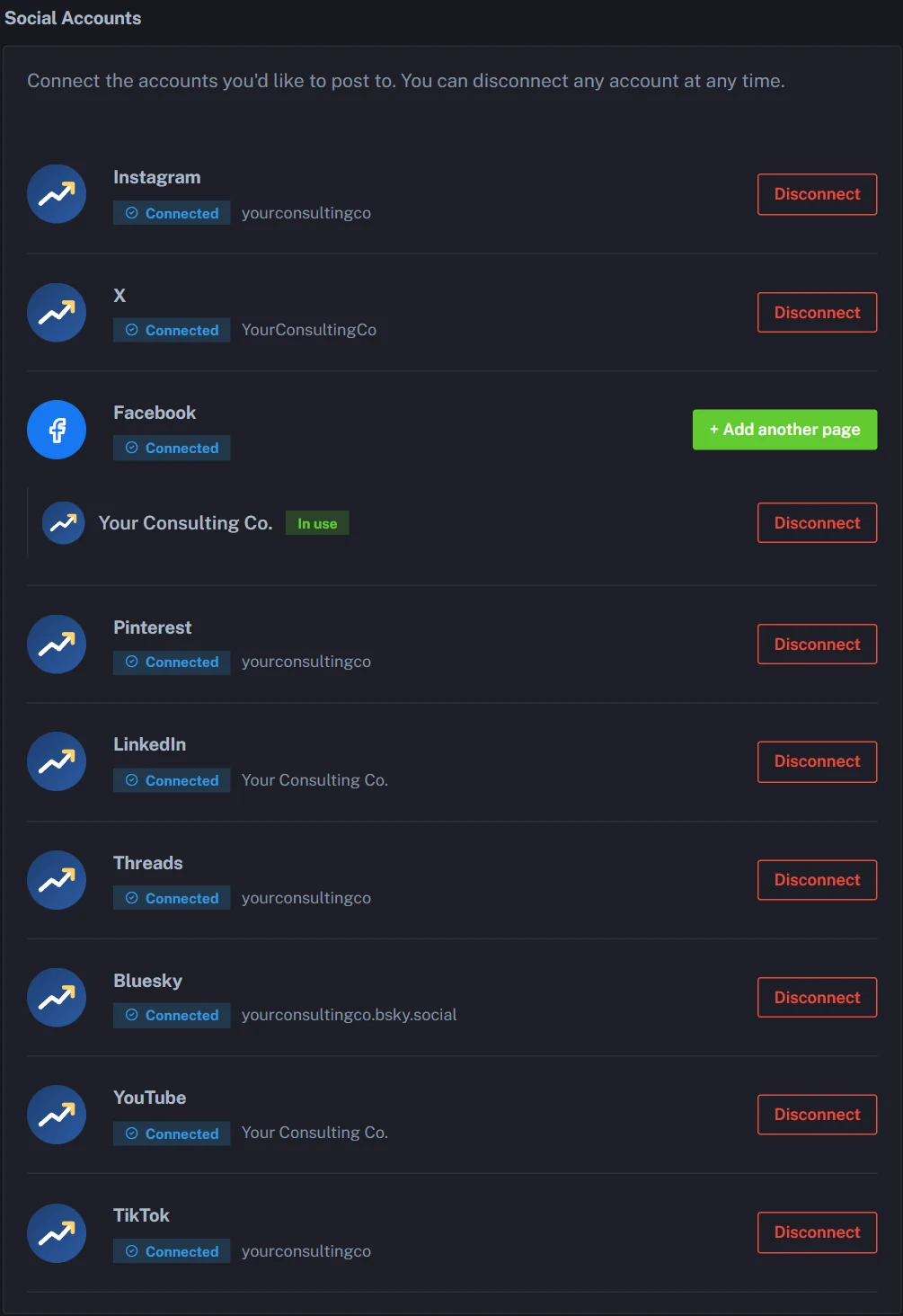
Rebuild your queue from the original sources (recommended)
Go back to what each post was about and get fresh captions written for each platform.
- Open New Post and pick the matching tile: URL for an article or product page, YouTube for a YouTube video, or Document for a PDF or Word file.
- Paste the link or upload the file, then click Generate.
- Optional Review each platform's caption in Step 2, editing or refreshing any that need it.
- Choose Schedule for Later, pick a date and time, and click Schedule Post.
Got the photos or videos as files? Bulk Schedule's Generate from Media writes a caption for each one in one batch (Pro and Agency, and included in the free trial).
Or copy your existing captions with Bulk Schedule
Bulk Schedule is on Pro and Agency, and the free trial includes it.
- Open Bulk Schedule in the sidebar and choose Import CSV.
- Click Download CSV Template.
- Put one caption per row in the
captioncolumn, the only required one. - Optional Add a public link to any image or video file in
media_url, and fill inmedia_type. - Optional Add a time in
scheduled_at, or leave it blank. - Import the file and choose your Platforms for this batch.
- Optional Review and edit every row.
- Use Auto-fill blank times with a start date and Every day or Specific weekdays to space out undated posts. Skip it only if every row already has a time, since rows without one can't be scheduled.
- Schedule the batch.
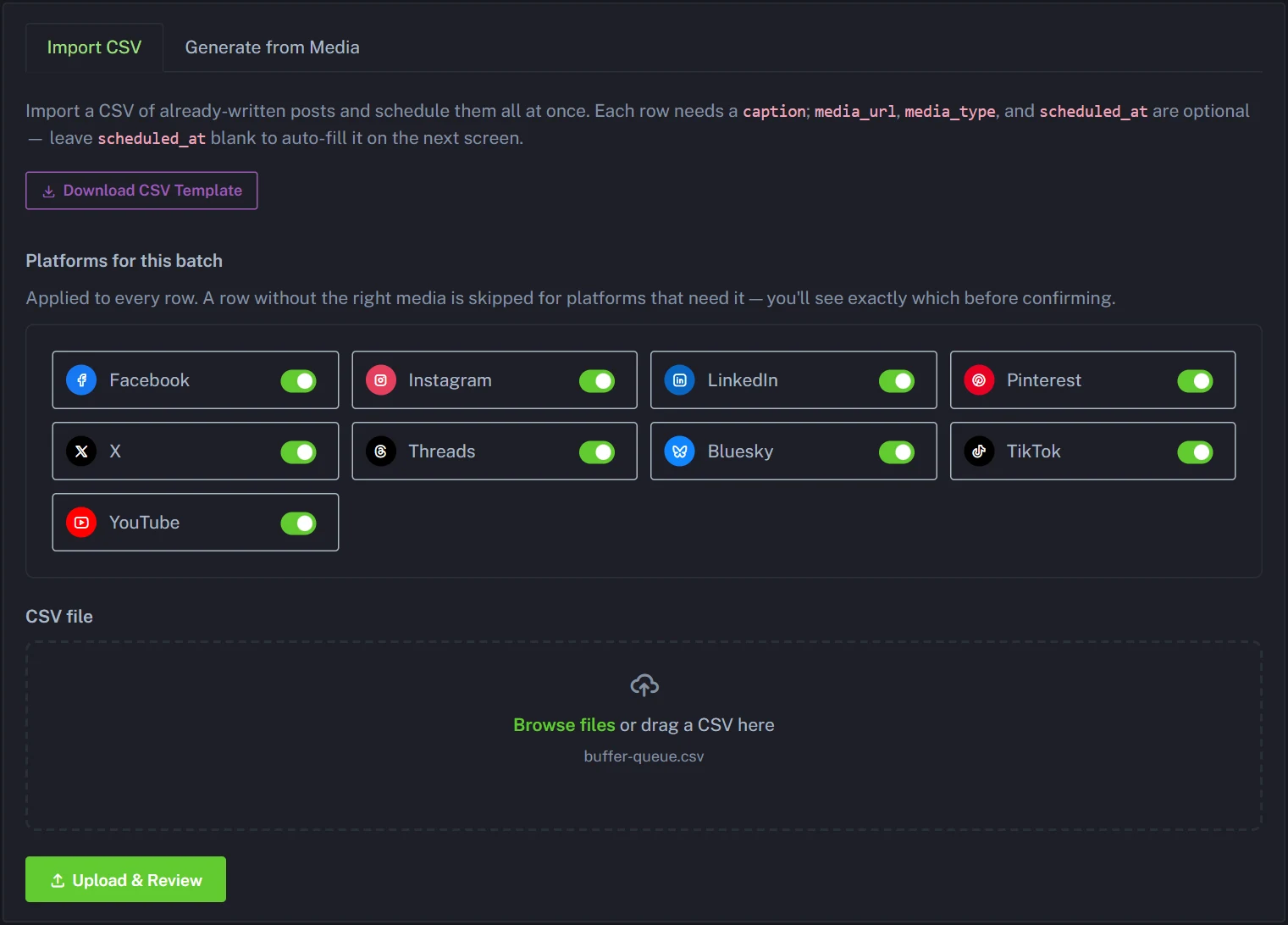
Imported captions go out exactly as written to every platform in the batch; they aren't rewritten for each one. There's no Link to add to the post field here, so any link has to be in the caption itself, and each row counts as one post against your plan however many platforms it reaches. Once everything is on your Calendar, remove the same posts from Buffer so nothing goes out twice.
The bottom line
Buffer is still a good choice for a few accounts, or a team that lives in its inbox and approvals. For everyone else, and especially one brand that wants to be on all 9 platforms, PostAnything is the best Buffer alternative: the lowest price for all nine, a separate caption written for each in your voice, and the simplest setup of any tool here. It's an AI social media scheduler built for exactly that.
Try it with 5 free posts before you subscribe, each one published to every platform you connect. No credit card, no time limit.
Start Free Trial