So when is the best time to post on TikTok? We lined the studies up and picked a time for every day of the week, based on where they overlap. You'll also find the best day to post on TikTok, today's time at a glance, US time zones and how often to post. Then we'll show you how to find your own best time in TikTok Studio, and how to schedule TikToks for it, so the video goes out while you're busy with something else.
A quick disclosure: we make PostAnything, an AI social media scheduler that writes your captions and publishes them to Facebook, Instagram, LinkedIn, Pinterest, X (formerly Twitter), Threads, Bluesky, TikTok and YouTube at the times you choose. We don't sell posting-time data, so we've no reason to favour any one study.
yourcafe Friday treat run 🍩 The new glazed range drops at 5. Which one are you picking? #donuts #fridayfeeling
Is there a best time to post on TikTok?
Is there a good time to post on TikTok, or is it all down to the algorithm? There is, roughly, but it isn't the same for every account. All four studies found clear patterns, and all four say your own audience matters more than their averages.
Here's where they agree:
- Late afternoon into evening is the best time of day to post on TikTok. Sprout Social's strongest times are midweek afternoons, Tuesday to Thursday from 2 to 6 p.m. Metricool's heaviest views fall between 6 and 8 p.m., and Buffer's engagement peaks between 6 and 11 p.m.
- Friday from 4 to 6 p.m. is the clearest overlap all week. Sprout, Hootsuite and Buffer all put their Friday peak in or right next to it.
- The middle of the night is a poor bet. Metricool calls 2 to 4 a.m. a dead zone, and Hootsuite warns against weekend posts before 7 a.m.
- Weekends split the studies. Sprout says to avoid them, Buffer names Saturday its best day, and Metricool sees its biggest traffic on Sunday.
The short answer: post on a weekday between about 4 and 8 p.m. in your followers' time zone. If you want a single slot, Friday from 4 to 6 p.m. has the most support. Pick your time once, and PostAnything publishes your video then, with a caption written for TikTok and each of your other platforms. Try it with 5 free posts, each sent to all your platforms.
Why the big studies disagree
They measured different things, from different accounts:
- Sprout Social counted nearly 2 billion engagements across about 307,000 profiles over three winter months, with times in local time.
- Buffer measured the median engagement rate of 7.1 million TikTok posts (videos, carousels, photos and text) published through its tool. It says its times work anywhere without converting.
- Hootsuite analysed more than a million social posts, plus its own experiments, with times localised across 118 countries.
- Metricool analysed more than 2.3 million posts from over 92,000 accounts and ranks hours by views. It doesn't say which time zone it uses.
Each study only sees the accounts that use that company's tool, so each reflects a different crowd. Some count total engagement, one uses engagement rate and one counts views. A busy hour can win on total views and lose on rate, simply because everyone else posts then too. That's why our picks come from the overlaps, not from any single number.
Later publishes TikTok advice too, but it comes from its own account rather than a study across many: weekdays at 10 a.m. Pacific worked best for its team. (The sources are listed at the end.)
Does post time matter on TikTok?
Yes, but less than the video itself. According to Buffer, TikTok watches how a video's first viewers react, especially in the first hour or so, to decide whether to push it further on the For You page. Post while your followers are asleep and that first test happens with almost nobody around.
Timing only gets you so far, though. Hootsuite notes that videos on the For You page are usually no more than a couple of days old, so you're aiming for a good start, not one perfect minute. Buffer is blunt about it: timing is a boost, not a fix. If people swipe away in the first few seconds, no posting time will save the video. Get the hook and the watch time right first, then use timing to give a good video a fair start.
What's the best day to post on TikTok?
There isn't one the studies agree on. If you post a few times a week, Monday and Tuesday are the safe choice: they're the only days none of the four studies rates as weak.
| Study | Best day(s) | Weakest day(s) |
|---|---|---|
| Sprout Social | Tuesday, Wednesday, Thursday | Saturday and Sunday (Sunday the worst) |
| Buffer | Saturday, then Monday and Sunday | Wednesday and Thursday |
| Hootsuite | Thursday morning and Saturday midday (its two best windows) | No day named; avoid weekend posts before 7 a.m. |
| Metricool | Sunday (its busiest day for views) | Saturday (its quietest) |
Posting on TikTok at the weekend vs during the week
This is where TikTok differs most from Instagram, where Saturday is a weak day in three of the four big studies (see our guide to the best time to post on Instagram). The best time to post on TikTok at the weekend depends on whose data you trust. Buffer's best single slot of the week is Sunday at 9 a.m., and it names Saturday its best day. Metricool sees its biggest traffic on Sunday evenings. Sprout tells you to avoid weekends entirely.
The best time to post on TikTok during the week is easier to pin down. Weekday afternoons and evenings come out well in most of the data. Keep your most important videos for weekdays, then test one weekend slot for a month and let your own numbers decide.
Best time to post on TikTok for each day of the week
Here's the best time to post on TikTok by day, with our pick first. All times are in your followers' local time.
Best time to post on TikTok on Monday
Our pick: 3 to 5 p.m. Sprout Social found 3 to 5 p.m. and Hootsuite 5 p.m., so the late afternoon has the most backing. Buffer prefers earlier, at 1 p.m. (then 11 a.m. and 8 a.m.), and calls Monday its second-best day. Metricool found 8 p.m., then 7 p.m.
Best time to post on TikTok on Tuesday
Our pick: start around 2 p.m., then test 8 p.m. Tuesday has no real overlap. Hootsuite's lunchtime window (10 a.m. to 1 p.m.) ends just as Sprout's afternoon one (2 to 6 p.m.) begins, and Sprout counts Tuesday among its peak days. For an evening slot, Metricool found 8 p.m. (then 7 p.m.). Buffer's best Tuesday time is 6 a.m., followed by 10 p.m. and 7 a.m.
Best time to post on TikTok on Wednesday
Our pick: 4 to 6 p.m., or 7 to 8 p.m. for an evening slot. Sprout's Wednesday window is its widest of the week, 1 to 8 p.m. Hootsuite's 4 to 6 p.m. sits inside it, and so does Metricool's 7 to 8 p.m. Buffer found 10 p.m. (then 6 a.m. and 9 p.m.), but rates Wednesday a quieter day overall.
Best time to post on TikTok on Thursday
Our pick: 1 p.m. Sprout (1 to 5 p.m.) and Buffer (1 p.m., then 10 p.m. and 6 a.m.) meet here. Hootsuite goes the other way: Thursday morning is one of its two best windows of the whole week, with 7 to 9 a.m. its pick for the day. Metricool found 8 p.m., then 7 p.m.
Best time to post on TikTok on Friday
Our pick: 4 to 6 p.m., the clearest overlap of the week. Sprout found 3 to 5 p.m., Hootsuite 4 to 6 p.m. and Buffer 6 p.m. The best time to post on TikTok on a Friday night is 8 p.m., where Buffer (its third-best Friday time, after 6 and 10 p.m.) and Metricool meet. Metricool does note that Friday evening views run a little lower, as people head out.
Best time to post on TikTok on Saturday
Our pick: 3 to 5 p.m., if you post at all. The studies split hardest here. Buffer names Saturday its best day, with 5 p.m. first (then 4 and 3 p.m.), and Hootsuite rates 10 a.m. to 7 p.m. as strong. Sprout says to avoid Saturdays, and Metricool calls it the quietest day, with its best views around 6 to 7 p.m.
Best time to post on TikTok on Sunday
Our pick: 9 a.m. to 12 p.m. Buffer's single best slot of the entire week is Sunday at 9 a.m. (then 1 p.m. and 12 p.m.), and Hootsuite found 8 a.m. to 12 p.m. Metricool also rates Sunday highly, but in the evening: 8 p.m. is its biggest traffic point of the week. Sprout calls Sunday the worst day to post.
All seven days at a glance
Here are the best times to post on TikTok each day in one table.
| Day | Our pick | Sprout Social | Buffer | Hootsuite | Metricool |
|---|---|---|---|---|---|
| Monday | 3–5 p.m. | 3–5 p.m. | 1 p.m. (11 a.m., 8 a.m.) | 5 p.m. | 8 p.m. (7 p.m.) |
| Tuesday | ~2 p.m., then test 8 p.m. | 2–6 p.m. | 6 a.m. (10 p.m., 7 a.m.) | 10 a.m.–1 p.m. | 8 p.m. (7 p.m.) |
| Wednesday | 4–6 p.m. or 7–8 p.m. | 1–8 p.m. | 10 p.m. (6 a.m., 9 p.m.) | 4–6 p.m. | 7–8 p.m. |
| Thursday | 1 p.m. | 1–5 p.m. | 1 p.m. (10 p.m., 6 a.m.) | 7–9 a.m. | 8 p.m. (7 p.m.) |
| Friday | 4–6 p.m. | 3–5 p.m. | 6 p.m. (10, 8 p.m.) | 4–6 p.m. | 8 p.m. |
| Saturday | 3–5 p.m., if you post | Avoid | 5 p.m. (4, 3 p.m.) | 10 a.m.–7 p.m. | 6–7 p.m. |
| Sunday | 9 a.m.–12 p.m. | Worst day | 9 a.m. (1 p.m., 12 p.m.) | 8 a.m.–12 p.m. | 8 p.m. |
Post at these times without being online. PostAnything writes the caption for TikTok (and for Instagram, YouTube and the rest), then publishes your video at the time you pick. On Pro, Bulk Schedule fills a month of Mondays, Wednesdays and Fridays in one sitting. Start free with 5 posts, each sent to all your platforms.
What's the best time to post on TikTok today?
Find today's row in the table above and use the Our pick column. Planning tomorrow's video? Use tomorrow's row. If you'd rather have one rule, when should you post on TikTok? On a weekday between 4 and 8 p.m. in your followers' time zone. Can't be online then? Schedule it in PostAnything now and it goes out on its own.
If today is Saturday or Sunday, it's a judgement call. The weekend picks have support from two studies each, but Sprout's data says the opposite, so it's a good day for a lighter video or a test.
Is it better to post on TikTok in the morning or at night?
Mostly later in the day, with a few exceptions. Buffer finds evenings (6 to 11 p.m.) win on most days, with afternoons (12 to 5 p.m.) the weakest. Metricool's best hours fall between 6 and 8 p.m. Sprout disagrees on afternoons, putting weekday afternoons first.
The exceptions are some mornings. Buffer's single best time is Sunday at 9 a.m., and Hootsuite's picks include Thursday from 7 a.m. and Sunday from 8 a.m. Later's own team also found earlier posts reached more people. So start in the late afternoon or evening, then test one morning slot against it.
Best time to post on TikTok for views (and engagement)
Metricool is the only one of the four studies that ranks hours by views, and its answer is the evening. The 6 to 8 p.m. block carries the heaviest views all week, peaking at 8 p.m. on most days, with Sunday evening the biggest of all. If views are your main goal, start there.
Sprout, Buffer and Hootsuite measure engagement (likes, comments, shares and similar), so they're the better guide to the best time to post on TikTok for engagement. That's why our picks lean on the late afternoon, where those studies cross, while 8 p.m. is the slot for chasing views.
Is there a best time to post on TikTok to go viral?
No time guarantees a viral video. What the data does show is that posting more often gives you more chances. Buffer's study of 11.4 million TikTok posts found that the typical post's views stayed flat as accounts posted more often, but their best posts did far better. Frequency raises the ceiling, not the floor. Good timing then gives each of those videos a fair first hour.
Best time to post on TikTok in EST, CST, MST and PST
Your followers' time zone matters more than yours. Sprout and Hootsuite report local time, and Buffer says its times work anywhere without converting (Metricool doesn't say). So the picks above are the same clock time in every zone. If most of your followers are on Pacific time, Friday's best time is 4 to 6 p.m. Pacific time (PST, or PDT in summer). If they're on Eastern time, it's 4 to 6 p.m. Eastern.
It gets trickier when one post has to reach followers across the US, or when you live in a different zone from your audience. The table shows each day's pick in Eastern time and what that is in Central, Mountain and Pacific time. Live in Los Angeles with followers mostly in New York? Schedule for the time in the Pacific column.
| Day | Eastern (EST/EDT) | Central (CST/CDT) | Mountain (MST/MDT) | Pacific (PST/PDT) |
|---|---|---|---|---|
| Monday | 3–5 p.m. | 2–4 p.m. | 1–3 p.m. | 12–2 p.m. |
| Tuesday | 2 p.m. (test 8 p.m.) | 1 p.m. (7 p.m.) | 12 p.m. (6 p.m.) | 11 a.m. (5 p.m.) |
| Wednesday | 4–6 p.m. | 3–5 p.m. | 2–4 p.m. | 1–3 p.m. |
| Thursday | 1 p.m. | 12 p.m. | 11 a.m. | 10 a.m. |
| Friday | 4–6 p.m. | 3–5 p.m. | 2–4 p.m. | 1–3 p.m. |
| Saturday | 3–5 p.m. | 2–4 p.m. | 1–3 p.m. | 12–2 p.m. |
| Sunday | 9 a.m.–12 p.m. | 8–11 a.m. | 7–10 a.m. | 6–9 a.m. |
These gaps hold all year, because the US zones change their clocks together. The exception is most of Arizona, which stays on Mountain Standard Time year-round, so in summer it matches Pacific time.
Here's Friday's 4 to 6 p.m. slot in each zone, whether your followers are local or on the East Coast:
- Best time to post on TikTok in EST (Eastern Standard Time, or EDT in summer): 4 to 6 p.m. Eastern time.
- Best time to post on TikTok in CST (Central time): 4 to 6 p.m. for followers on Central time, or 3 to 5 p.m. to reach the East Coast.
- Best time to post on TikTok in MST (Mountain time): 4 to 6 p.m. for local followers, or 2 to 4 p.m. to reach the East Coast.
- Best time to post on TikTok in PST (Pacific time): 4 to 6 p.m. for West Coast followers, or 1 to 3 p.m. to reach the East Coast.
Notice the trade-off: an Eastern late-afternoon post lands around lunchtime in California. If your followers are split, aim for your largest group. TikTok Studio's follower insights show where they are.
Best time to post on TikTok in the UK, Australia and the Philippines
Use the same picks in local time. Sprout's data covers profiles around the world, and Hootsuite localised its times across 118 countries. So the best time to post on TikTok in the Philippines is Friday from 4 to 6 p.m. Manila time. In Australia it's the same 4 to 6 p.m. in your followers' own city, whether that's Sydney or Perth, and the best time to post on TikTok in the UK is 4 to 6 p.m. UK time. If you're scheduling for followers in another country, convert to your own clock first. Manila, for example, is seven or eight hours ahead of London, depending on the time of year, so 4 p.m. in Manila is 8 a.m. in London in winter and 9 a.m. in summer.
How often should you post on TikTok?
More often than on most apps, but less than the famous advice suggests. Here's what the sources say:
- TikTok itself told businesses to aim for 1 to 4 posts a day in its creative guide for brands, as a way to test what lands with viewers. It's older advice, written with advertisers in mind.
- Buffer analysed 11.4 million posts from over 150,000 accounts. Going from one post a week to 2 to 5 brought up to 17% more views per post, the biggest jump for the extra effort. Posting 6 to 10 times a week reached 29%, and 11 or more reached 34%. The gains held across account sizes.
- Metricool recommends aiming for at least one post a day.
So how often should you post on TikTok to grow? If you can keep the quality up, posting every day gives you more chances at a breakout. If you can't, 2 to 5 good videos a week gets you the biggest single step up in Buffer's data. Pick a pace you can keep for months, then put those posts on your best days.
How many times should you post on TikTok a day? Most accounts don't need more than one. And how many times can you post on TikTok a day? We couldn't find a daily cap in TikTok's own guidance, and Buffer's views per post kept rising right up to 11 or more posts a week. If you do post several a day, spread them across your followers' active hours rather than stacking them together.
PostAnything's Basic plan gives you 30 posts a month, and each one goes out to TikTok and every other platform you've connected. That's about one video a day. Pro gives you 300 posts a month, enough for several a day, and each still counts as 1 however many platforms it reaches. See PostAnything plans and pricing for the details.
How to see the best time to post on TikTok for your own account
Averages are a starting point. Your followers might be students, night-shift workers or on the other side of the world.
Find your followers' most active times in TikTok Studio
TikTok shows this for free, in TikTok Studio's Analytics. Hootsuite notes you need a Business or Creator account to see audience insights, and according to Buffer, the Followers tab only fills in once you have at least 100 followers. Here's how to check:
- Open TikTok and go to your profile.
- Tap TikTok Studio, just under your bio. On a computer, go to tiktok.com/tiktokstudio.
- On the Analytics card, tap View all.
- Open the Followers tab and scroll to Most active times.
TikTok also shows activity times on the Viewers tab, which covers everyone who watched, not just followers. TikTok's help page on TikTok Studio explains each Analytics tab. TikTok moves these labels around from time to time, so if you can't find one, look in the followers or viewers section.
Buffer's tip is worth stealing: post slightly before your followers' busiest hour, so the video is already waiting when they arrive.
Test it for a few weeks
Turn the data into a simple test:
- Pick two windows: one from our table and one from your Most active times.
- Alternate between them for three or four weeks, posting similar videos in each.
- Compare views, watch time and new followers per video in TikTok Studio.
- Keep the winner and try a new challenger.
PostAnything makes the test easy to keep up. In Bulk Schedule, give alternate rows your two times, say Friday at 4 p.m. and Friday at 8 p.m., then judge the results in TikTok Studio.
How to schedule TikToks for your best times
Knowing your best time only helps if you're free at that moment. Scheduling means you don't have to be. Here's how to do it with PostAnything, and with TikTok's free scheduler if TikTok is all you need.
With PostAnything
PostAnything is an AI social media scheduler that writes the captions and publishes them for you. It helps most when your video is going to more than TikTok.
PostAnything writes every caption in seconds, so once TikTok is connected, scheduling a video for your best time takes three steps:
The short version
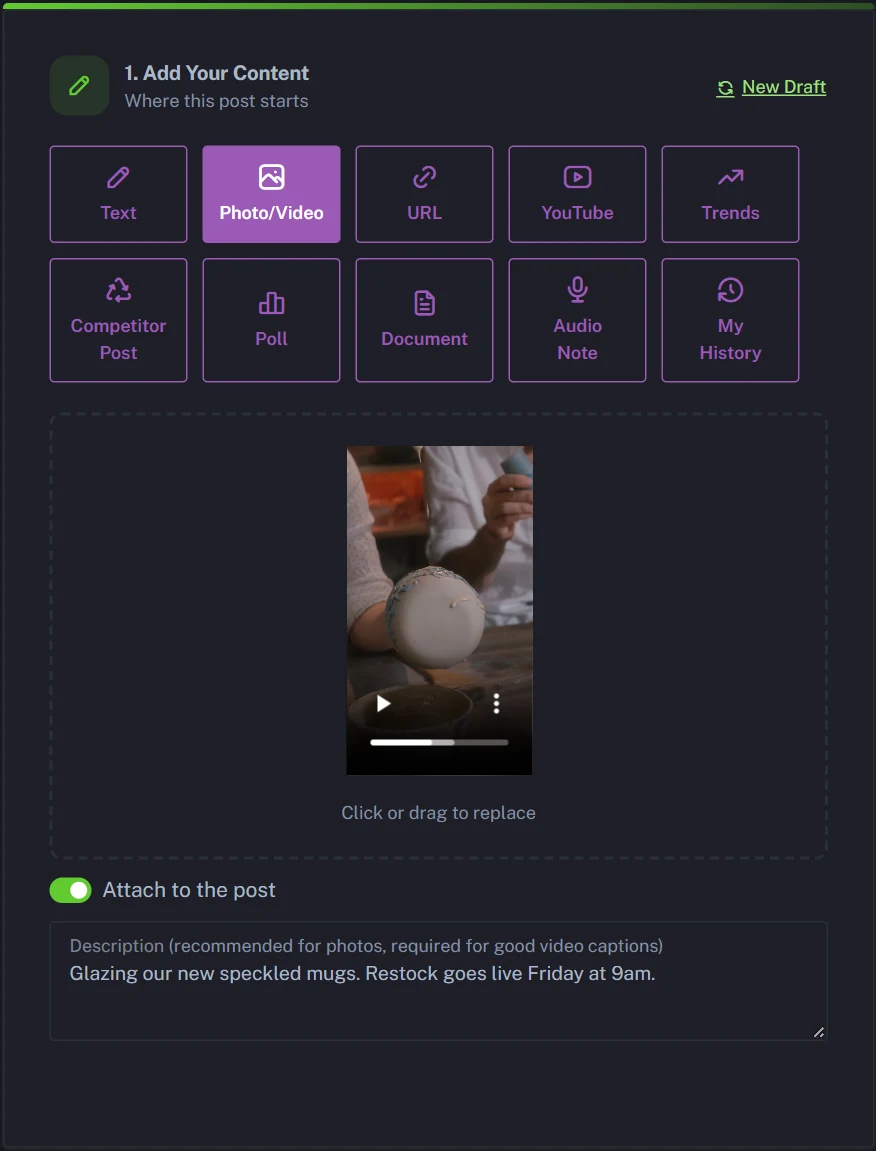
- Open New Post, pick Photo/Video and upload your vertical video.
- Write a sentence or two about it in Description, then click Generate.
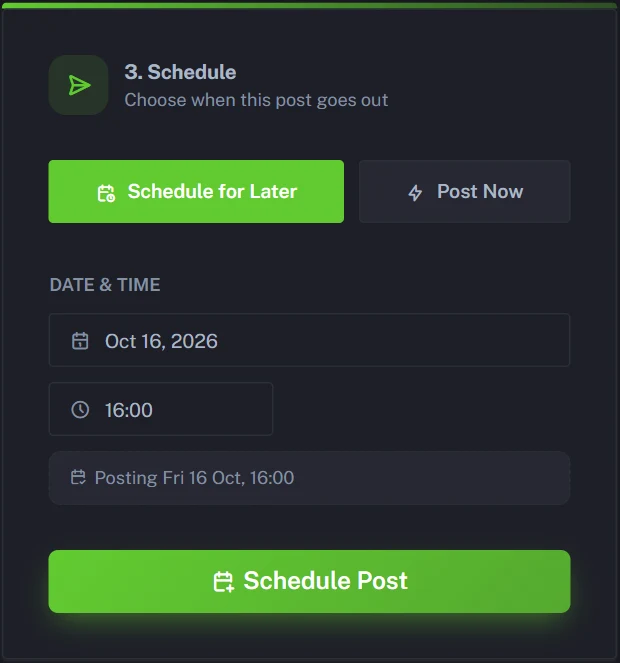
- Choose Schedule for Later, pick the date and time, and click Schedule Post.
Everything else below is one-time setup or optional, and labelled that way.
- One-time Click Start Free Trial on postanything.ai. You get 5 free posts (each one publishes to all your platforms), with no credit card needed.
- One-time Go to Connected Accounts and connect TikTok. It signs in with one click.
- Optional Open Voice & Style and click Analyze, so your captions sound like you.
- Open New Post and pick Photo/Video in Step 1. Upload an MP4, WEBM or MOV file (up to 100MB) and leave Attach to the post switched on. TikTok needs a video, so a photo-only post leaves TikTok out.
- Describe the video in the Description field. PostAnything doesn't watch the footage, so these words are what your captions are built from.
- Optional Add a link in Link to add to the post. It goes at the end of every caption, but TikTok shows caption links as plain text, so put it in your TikTok bio too.
- Optional Check Generation Preferences. Leave Hashtags on if you want hashtags on TikTok, and Tone on Auto.
- Click Generate.
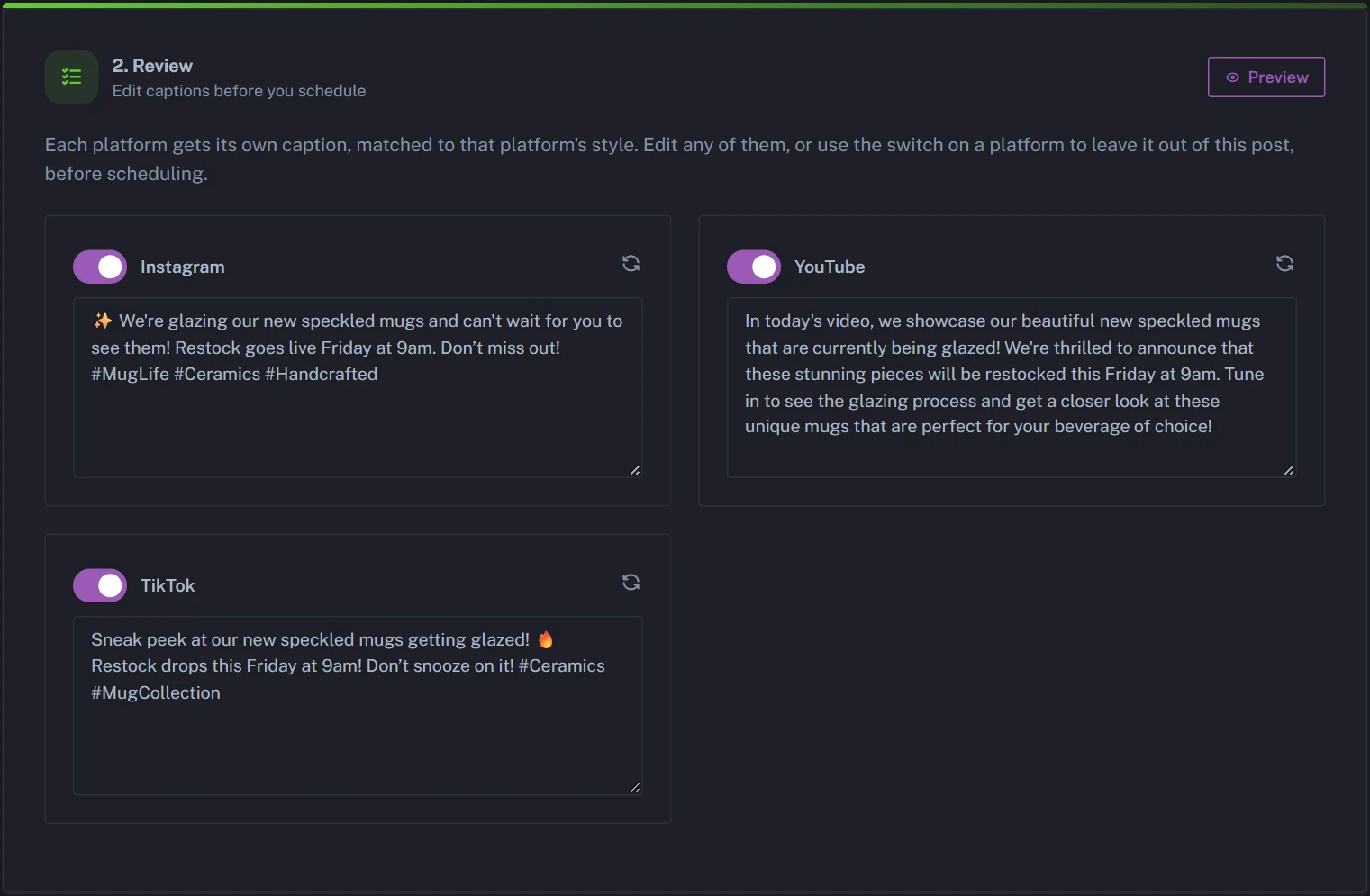
- Optional In Step 2, review and edit the TikTok caption card. It comes out casual, the way TikTok captions usually read. Use the switch on any other card to leave that platform out of this post.
- In Step 3, choose Schedule for Later, pick the date and time, then click Schedule Post. PostAnything uses your browser's time zone, so convert first if your followers live somewhere else.
Your video goes out as a normal public TikTok. The same upload can also go out as an Instagram and Facebook Reel and, if it's vertical and short, a YouTube Short, each with its own caption. Media is resized automatically: vertical for TikTok and Reels, while YouTube keeps the video's shape (a vertical clip becomes a Short, a landscape one a regular video). Our guide to uploading one video to TikTok, Reels and Shorts at once covers that side in detail. Starting from a long YouTube video instead? Cut a vertical clip first, then see how to turn a YouTube video into social media posts.
One post goes to all its switched-on platforms at the same moment. That matters, because TikTok's best time often isn't Instagram's. On Sunday, for example, our TikTok pick is 9 a.m. to noon, while our Instagram pick is 12 to 3 p.m. To hit both, make one post with only TikTok switched on, then click New Draft and make a second with TikTok switched off. Each post counts as 1, however many platforms it goes to.
Plans change? A scheduled post can't be edited, but you can cancel it in Post History or on the Calendar, adjust it and schedule it again.
With TikTok's own scheduler
TikTok has a free scheduler in TikTok Studio on desktop, and Hootsuite notes it lets you schedule up to 10 days ahead. It's fine for the odd video. But it's TikTok only, and you write every caption yourself. If the same clip is also going to Reels and Shorts, you'd repeat the whole job in each app. PostAnything has no limit on how far ahead you schedule.
Line up a month of TikToks with Bulk Schedule (Pro)
On the Pro plan, you get 300 posts a month, and each one goes out to every platform you've connected. Bulk Schedule lets you fill a month in one sitting, and the free trial includes it, so you can try it first.
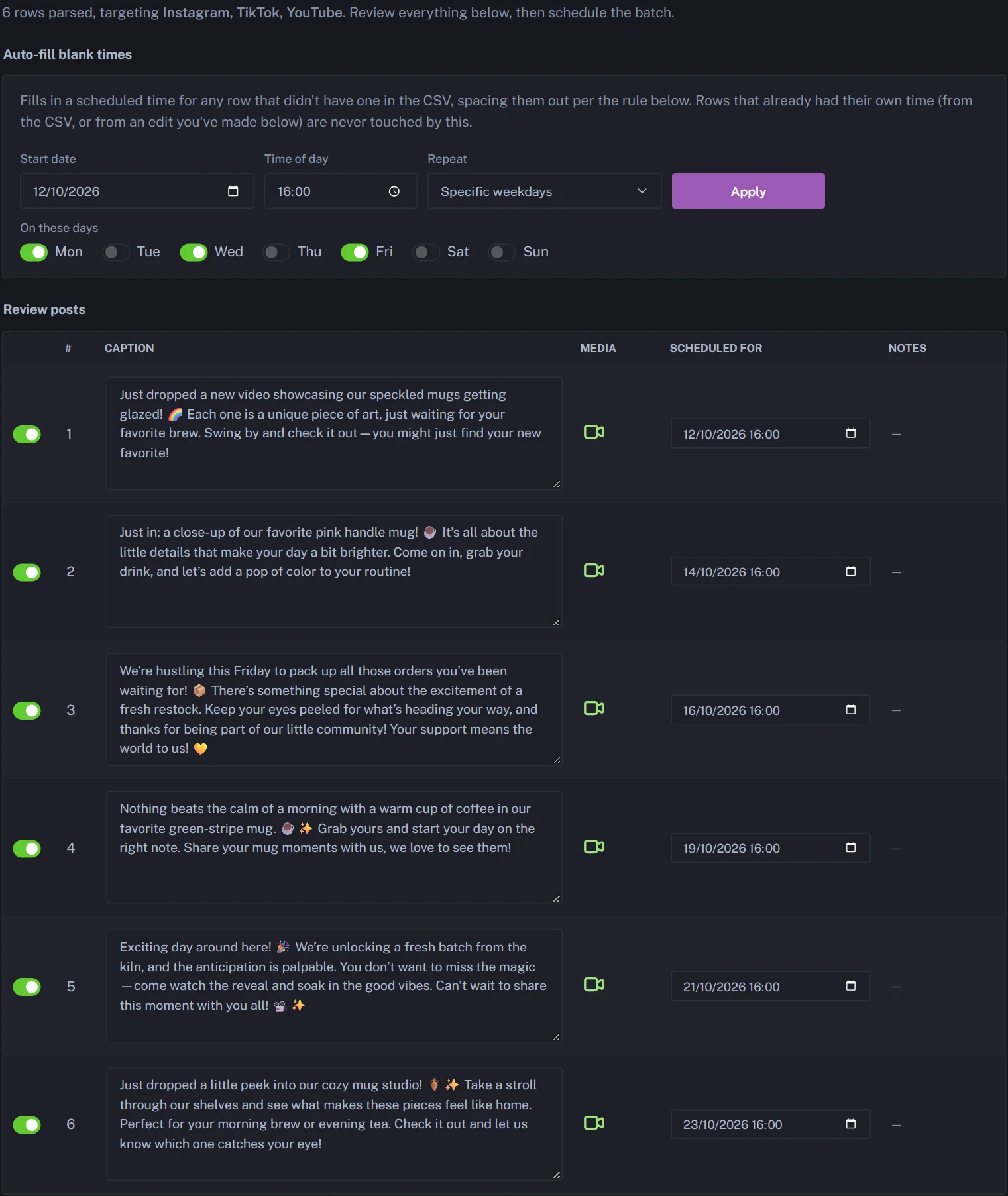
- Open Bulk Schedule in the sidebar.
- Choose Generate from Media and upload your videos, or a whole folder. AI writes a caption for each. It can't watch the clips, so give your files descriptive names.
- Choose Platforms for this batch, for example TikTok, Instagram and YouTube.
- Optional Review and edit every row. Bulk Schedule has no link field, so put any link in the caption itself.
- Click Auto-fill blank times, then set a start date, a time of day and Specific weekdays, such as Monday, Wednesday and Friday at 4 p.m.
- Schedule the batch.
The takeaway
There's no single best time to post on TikTok, but the studies agree more than they first seem to. Aim for late afternoon to evening in your followers' time zone, lean on weekdays, and treat Friday from 4 to 6 p.m. as your safest slot. Then check your own Most active times, test for a few weeks and keep what works.
When you're ready to stop setting alarms, start your free trial. You get 5 free posts, each one publishes to every platform you connect, and you don't need a credit card.
Start Free TrialSources
- Sprout Social: Best times to post on TikTok
- Buffer: Best time to post on TikTok
- Buffer: How often should you post on TikTok
- Buffer: TikTok analytics
- Hootsuite: The best time to post on TikTok
- Hootsuite: How to schedule TikTok posts
- Metricool: Best time to post on TikTok
- Later: Best time to post on TikTok