So when is the best time to post on Instagram? We put the studies side by side and picked the best time for every day of the week. We'll cover where the research agrees, the best day to post on Instagram, Reels, time zones and how often to post. Then we'll show you how to find your own best time and have PostAnything post at it for you, so you don't have to be online when it comes round.
A quick disclosure: we make PostAnything, an AI social media scheduler that writes your captions and publishes them to Facebook, Instagram, LinkedIn, Pinterest, X (formerly Twitter), Threads, Bluesky, TikTok and YouTube at the times you choose. We don't sell posting-time data, so we've no reason to favour any one study.
yourcafe Autumn menu starts today 🍂 Pumpkin loaf, chai lattes and a new seasonal blend.
What is the best time to post on Instagram?
The best time to post on Instagram is on a weekday between 12 p.m. and 7 p.m., in your followers' local time. The single strongest window is Tuesday from 3 to 7 p.m., followed by Wednesday at 12 p.m. or 5 to 6 p.m. The best days to post on Instagram are Tuesday and Wednesday, and Saturday is the weakest.
Is there a best time to post on Instagram?
Yes, but there isn't one time that works for everyone. All four studies found clear patterns, and all four say your own audience matters more than their averages.
Why does timing matter at all? The studies explain it the same way. A post that lands while your followers are scrolling picks up early likes, comments and shares, and that early engagement helps Instagram show it to more people.
Here's where the four studies agree:
- Weekdays beat weekends. Saturday is a weak day in three of the four studies.
- Midweek is strong. Tuesday and Wednesday come up again and again.
- The small hours are risky. Sprout, Buffer and Hootsuite all rate the middle of the night or early morning poorly. Only Later disagrees.
- Lunchtime to early evening is the safest bet. On Tuesdays and Wednesdays, Sprout, Buffer and Hootsuite all have a peak between noon and 7 p.m.
Found your slot? Pick it once, and PostAnything publishes there for you with a caption written for Instagram and each of your other platforms. Try it with 5 free posts, each sent to all your platforms.
Why the big studies disagree
They measured different things, from different accounts, over different periods:
- Sprout Social counted nearly 2 billion engagements across about 307,000 profiles, over three winter months.
- Buffer measured the median engagement rate of 9.6 million Instagram posts published through its tool over two years.
- Hootsuite analysed more than a million social posts, with times localised across 118 countries.
- Later analysed over 6 million Instagram posts across ten months.
Each study only sees the accounts that use that company's tool, so each reflects a different crowd. Some count total engagement, while others use engagement rate. A busy time can do well on totals simply because lots of brands post then, and worse on rate for the same reason. That's why our picks below come from the overlaps, not from any single number. (The sources are listed at the end.)
What's the best day to post on Instagram?
Midweek. If you only post a few times a week, Tuesday and Wednesday are the days most of the data backs.
| Study | Best day(s) | Weakest day(s) |
|---|---|---|
| Sprout Social | Tuesday, Wednesday | Saturday, Sunday |
| Buffer | Wednesday, then Thursday and Tuesday | Friday, Saturday |
| Hootsuite | Monday, Tuesday, Thursday | No day named. Weakest hours are before 8 a.m. and after 10 p.m. |
| Later | Monday | Saturday |
Best time to post on Instagram during the week vs on weekends
During the week, the best time to post on Instagram is lunchtime to early evening, and Tuesday and Wednesday are the strongest days. The best time to post on Instagram on weekends is usually "later in the week", if you can wait. Sprout found the lowest engagement of all on Saturdays and Sundays. Buffer and Later both put Saturday at or near the bottom.
Weekend posts aren't wasted, though. They're a good home for lighter content, and if you sell something people browse on their days off, your own Insights may tell a different story. The day-by-day section below gives the best weekend windows each study found.
Is Sunday a good day to post on Instagram?
It's fine, but it isn't your strongest day. Sprout calls Sunday one of the worst days to post. Buffer rates it better than Friday and Saturday, with Sunday evening as its best weekend window. Hootsuite found a midday window. Keep your big launches for midweek and use Sunday for lighter posts.
Best time to post on Instagram for each day of the week
All times below are in your followers' local time. That's how all four studies report them.
Best time to post on Instagram on Monday
Our pick: 3 to 4 p.m., or 7 p.m. for an evening slot. Three of the four studies favour the afternoon or evening: Sprout Social found 2 to 4 p.m., Hootsuite 3 to 9 p.m. and Buffer 7 p.m. (then 6 and 8 p.m.). Later is the odd one out, with 5 a.m. and 11 p.m.
Best time to post on Instagram on Tuesday
Our pick: 3 to 7 p.m., the clearest overlap all week. It's inside the top windows of three studies at once: Sprout found 1 to 7 p.m., Buffer 7 p.m. (then 3 and 5 p.m.) and Hootsuite 3 to 7 p.m. (plus 5 to 8 a.m.). Later found 5 a.m.
Best time to post on Instagram on Wednesday
Our pick: 12 p.m. or 5 to 6 p.m. Buffer names Wednesday its best day, and Sprout calls it the peak of the week. Sprout found 12 to 9 p.m. (plus a late spike at 11 p.m.), Buffer 12 p.m. (then 6 p.m. and 8 a.m.) and Hootsuite 5 p.m. Later found 3 a.m., holding strong until 5 a.m.
Best time to post on Instagram on Thursday
Our pick: 12 to 2 p.m. as a starting point, then trust your own Insights. Thursday has no overlap at all: Sprout found 12 to 2 p.m., Buffer 9 a.m. (then 8 and 7 a.m., the only weekday where its mornings beat evenings), Hootsuite 4 to 5 p.m. and Later 4 to 5 a.m.
Best time to post on Instagram on Friday
Our pick: around 4 p.m., for lighter posts. Save launches for midweek. Sprout found no significant peak on Fridays, and Buffer rates Friday one of its two weakest days (its best slot is 10 p.m., then 9 p.m. and 6 a.m.). Hootsuite found around 4 p.m. and Later 3 to 6 a.m.
Best time to post on Instagram on Saturday
Our pick: 11 a.m. or 9 p.m., if you post at all. Saturday is the weakest day overall. Sprout found the lowest engagement of the week, and Later calls it its worst day (best slot 5 a.m.). Buffer found 9 p.m. (then 10 and 8 p.m.) and Hootsuite 11 a.m. and around 5 p.m.
Best time to post on Instagram on Sunday
Our pick: 12 to 3 p.m. Sprout counts Sunday among the worst days. Hootsuite found 12 to 3 p.m. and notes that activity drops after 9 p.m., while Buffer's best Sunday slot is 9 p.m. (then 10 and 8 p.m.). Later found 12 a.m., 5 a.m. and 11 p.m.
All seven days at a glance
| Day | Our pick | Sprout Social | Buffer | Hootsuite | Later |
|---|---|---|---|---|---|
| Monday | 3–4 p.m. or 7 p.m. | 2–4 p.m. | 7 p.m. (6, 8 p.m.) | 3–9 p.m. | 5 a.m., 11 p.m. |
| Tuesday | 3–7 p.m. | 1–7 p.m. | 7 p.m. (3, 5 p.m.) | 5–8 a.m., 3–7 p.m. | 5 a.m. |
| Wednesday | 12 p.m. or 5–6 p.m. | 12–9 p.m., 11 p.m. | 12 p.m. (6 p.m., 8 a.m.) | 5 p.m. | 3–5 a.m. |
| Thursday | 12–2 p.m., then test | 12–2 p.m. | 9 a.m. (8, 7 a.m.) | 4–5 p.m. | 4–5 a.m. |
| Friday | ~4 p.m., lighter posts | No clear peak | 10 p.m. (9 p.m., 6 a.m.) | ~4 p.m. | 3–6 a.m. |
| Saturday | 11 a.m. or 9 p.m. | Weakest day | 9 p.m. (10, 8 p.m.) | 11 a.m., ~5 p.m. | 5 a.m. |
| Sunday | 12–3 p.m. | Weak day | 9 p.m. (10, 8 p.m.) | 12–3 p.m. | 12 a.m., 5 a.m., 11 p.m. |
Post at these times without being online. PostAnything writes the caption for Instagram (and for Facebook, LinkedIn, TikTok and the rest), then publishes it at the time you pick. On Pro, Bulk Schedule fills a month of Tuesdays, Wednesdays and Thursdays in one sitting. Start free with 5 posts, each sent to all your platforms.
What's the best time to post on Instagram today?
Today's pick is the Our pick column of today's row in the table above, and the best time to post on Instagram tomorrow is simply the next row down. If you want one rule that works with most of the data, post on a weekday between lunchtime and early evening, in your followers' time zone. Won't be free then? Schedule it in PostAnything now and it goes out at that time on its own.
If today is a Friday or Saturday, there's no shame in holding your strongest post until Tuesday or Wednesday. Buffer gives the same advice.
Is it better to post on Instagram in the morning or at night?
Here the studies split completely. Later says morning wins by far, with its best results between 3 and 6 a.m., so if you want the best time to post on Instagram in the morning, that's the slot to test. Buffer says evenings (6 to 11 p.m.) win on every day except Thursday.
Sprout points to midday and afternoon and warns against 3 to 7 a.m. Hootsuite rates before 8 a.m. and after 10 p.m. as the least effective times. The middle of the day into early evening is where most of them meet, so start there before you test a morning slot.
When is the best time to post on Instagram Reels?
The best time to post an Instagram Reel depends on whose data you trust, because the Reels data is just as mixed:
- Sprout Social says the best times for Reels are the same as for photos, because Instagram cares more about when your audience is active than about the format.
- Buffer points to evenings, with Wednesday and Thursday strongest, though it analysed all post types together.
- Later analysed 975,000 Reels and found 12 a.m. the best time and Monday the best day.
Our advice: post Reels in your usual best windows, then compare their reach in Insights after a few weeks. In PostAnything, any video you send to Instagram publishes as a Reel, which also shows in your feed. If you're making one video for several apps, our guide to uploading a video to multiple platforms at once shows how one upload becomes a Reel, a TikTok and a YouTube Short. TikTok's timing is different, so if the same video goes there too, check the best time to post on TikTok.
Which time zone should you post in?
Your followers' time zone, not yours. All four studies give times in local time, so "7 p.m." means 7 p.m. wherever your audience lives. Hootsuite is the only one that breaks results out by time zone (more on that below).
That matters when you schedule. PostAnything uses the time zone of the browser you're scheduling from. Say you're in London and most of your followers are in New York, which is usually five hours behind. To hit 7 p.m. Eastern, you'd schedule for midnight your time. California, on Pacific time, is three hours behind New York. The same goes for anywhere else in the world: work out your followers' local time first, then convert it to yours.
If your followers are spread out, check their top locations in Insights. Later suggests aiming for your largest group, or a time that falls in a good window for two regions at once.
Best time to post on Instagram in EST and PST (USA)
The best time to post on Instagram in the USA follows the same windows, in your followers' own time zone. Tuesday's 3 to 7 p.m. means 3 to 7 p.m. EST for followers on the East Coast and 3 to 7 p.m. PST for followers in California and the rest of the West Coast. If your followers are spread across the country, one post on a Tuesday at 6 p.m. EST (5 p.m. CST, 3 p.m. PST) lands inside that window on both coasts. Hootsuite's time-zone data adds a weekend tip: Saturday at 11 a.m. stood out for EST, and 9 a.m. on Saturday for PST. The same goes for every day in the table: each “Our pick” time is EST for East Coast followers and PST for West Coast ones, so the best time to post on Instagram on Friday is around 4 p.m. EST in New York and 4 p.m. PST in Los Angeles.
Best time to post on Instagram in India
For followers in India, the same local windows apply in IST: weekday lunchtimes to early evenings, with Tuesday from 3 to 7 p.m. the strongest. If you're in India and your followers are in the US, convert first: 6 p.m. in New York is around 3:30 to 4:30 a.m. IST the next morning, depending on US daylight saving time. That's a slot to schedule rather than stay up for. PostAnything uses your browser's time zone, so you pick the IST time and the post goes out on its own.
How often should I post on Instagram?
There's no magic number, but the advice falls in a range of about two to five feed posts a week:
- Instagram itself: Head of Instagram Adam Mosseri has advised a couple of feed posts a week plus a couple of Stories a day.
- Buffer recommends three to five posts a week.
- Dash Social found two to three feed posts a week drove the highest engagement.
Pick a number you can keep up for months, then put those posts on your best days. PostAnything's Basic plan gives you 30 posts a month, and each one goes out to every platform you've connected. That's enough for five Instagram posts a week with room to spare. See PostAnything plans and pricing for the details.
How to see the best time to post on Instagram for your own account
Averages are a starting point. Your followers might be night owls, shift workers or on the other side of the world.
How to find the best time to post on Instagram in Insights
Instagram shows this for free on any public account, personal or professional. It only shows follower trends, including their most active times, once you have at least 100 followers. Here's how to check the best time to post on Instagram for your account:
- Open the Instagram app and go to your profile.
- Tap Professional dashboard (on a personal account, Your dashboard).
- Open your insights and tap Total followers.
- Scroll to Most active times and switch between Hours and Days.
Instagram moves these labels around from time to time, so if you don't see one, look for the followers section of your insights.
One caveat, which Buffer also makes: these are the hours your followers are on Instagram, not necessarily when they engage with your posts.
Test it for a few weeks
Turn the data into a simple test:
- Pick two windows: one from the study overlap and one from your Most active times.
- Alternate between them for three or four weeks, posting similar content in each.
- Compare reach and engagement per post in Insights, or in PostAnything's Analytics, which shows engagement over time and your top-performing posts.
- Keep the winner and try a new challenger.
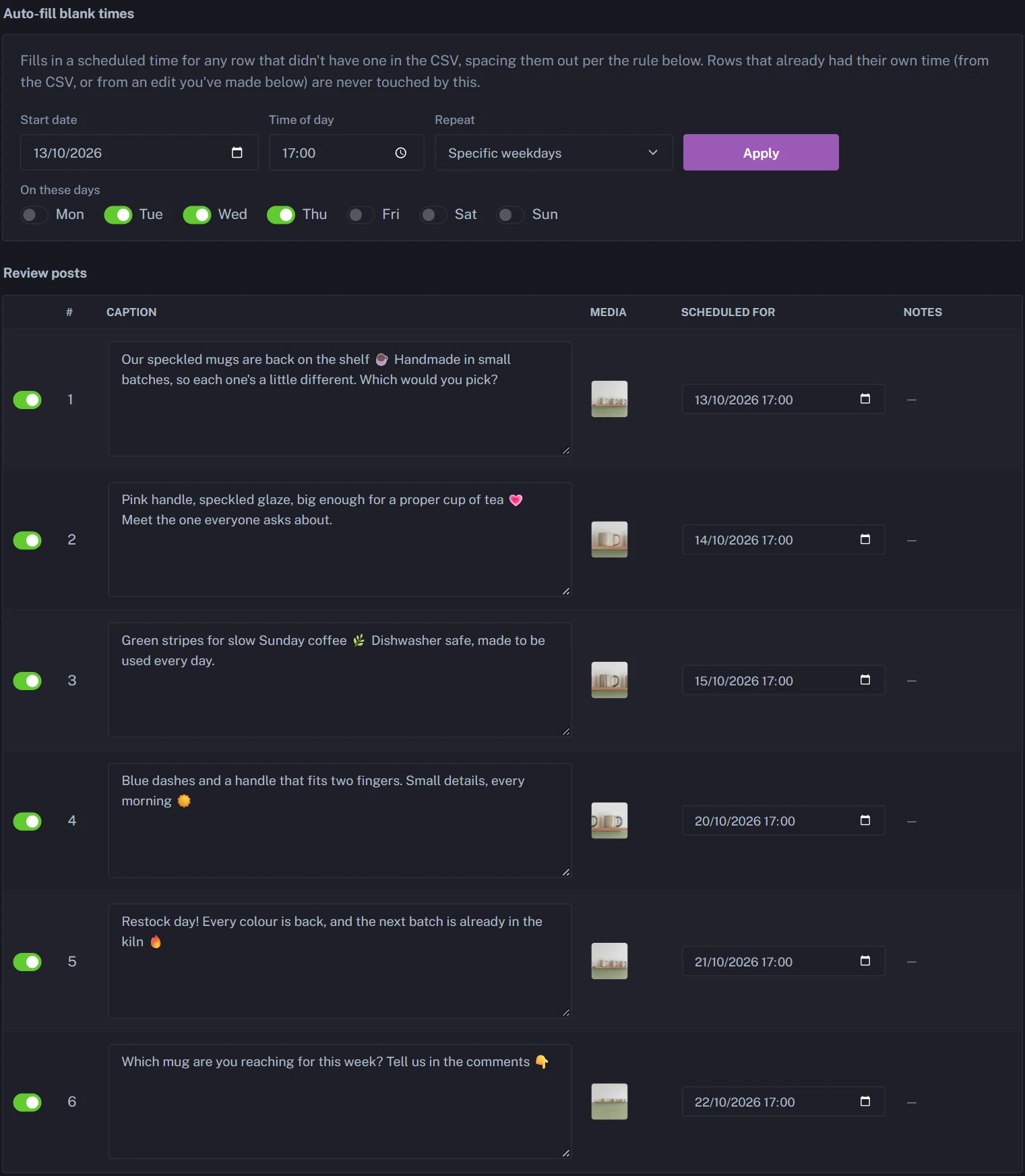
PostAnything makes the test easy to keep up. In Bulk Schedule, give alternate rows your two times, say Tuesday at 12 p.m. and Tuesday at 6 p.m., or let Auto-fill blank times spread them over the weekdays you pick. After a few weeks, open Analytics: Top Performing Posts shows which posts drew the most likes, comments and shares, and Engagement Over Time shows the trend, so you can see which window is winning without a spreadsheet.
How to schedule Instagram posts for your best times
Knowing your best time only helps if you're free at that moment. Scheduling means you don't have to be. Here's how to do it with PostAnything, and with Instagram's free scheduler if Instagram is all you need.
With PostAnything
PostAnything is an AI social media scheduler that writes the captions and schedules them. It helps most when you post to more than Instagram. Here's how to schedule a post for an exact time.
PostAnything writes every caption in seconds, so once Instagram is connected, a post at your best time takes three steps:
The short version
- Open New Post, pick Photo/Video and add your photo or video.
- Click Generate.
- Choose Schedule for Later, pick the date and time, and click Schedule Post.
Everything else below is one-time setup or optional, and labelled that way.
- One-time Click Start Free Trial on postanything.ai. You get 5 free posts (each one publishes to all your platforms), with no credit card needed.
- One-time Go to Connected Accounts and connect Instagram. It signs in with Instagram and needs a Business or Creator account, but no Facebook Page.
- Optional Open Voice & Style and click Analyze so your captions sound like you.
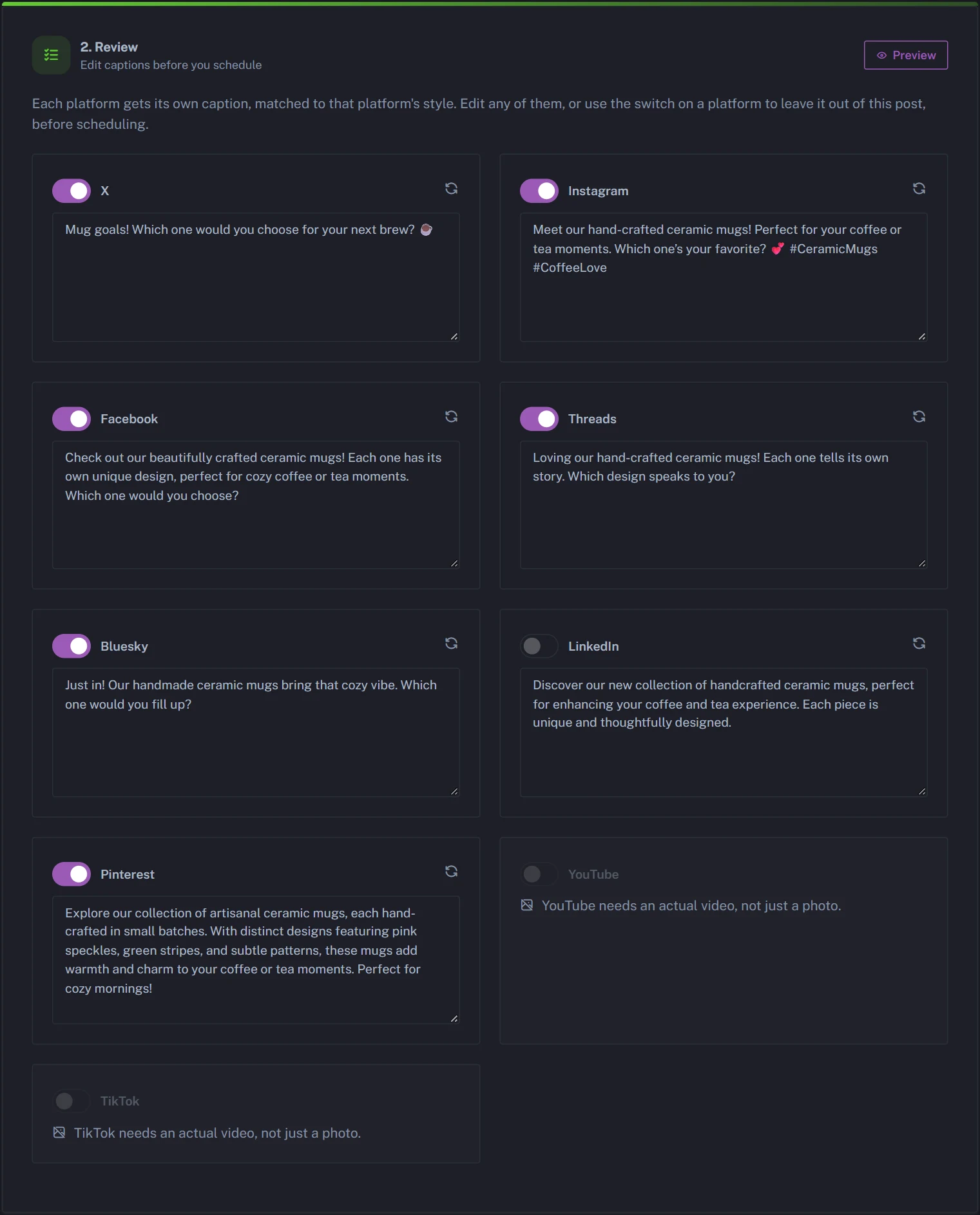
- Open New Post and pick a source tile in Step 1. Instagram needs a photo or video, so use Photo/Video, or add media in the Add a Photo or Video card after generating. You can also start from a link, such as a product page or a blog post.
- Click Generate.
- Optional In Step 2, review and edit the Instagram caption card. Use the switch on any card to leave that platform out of this post.
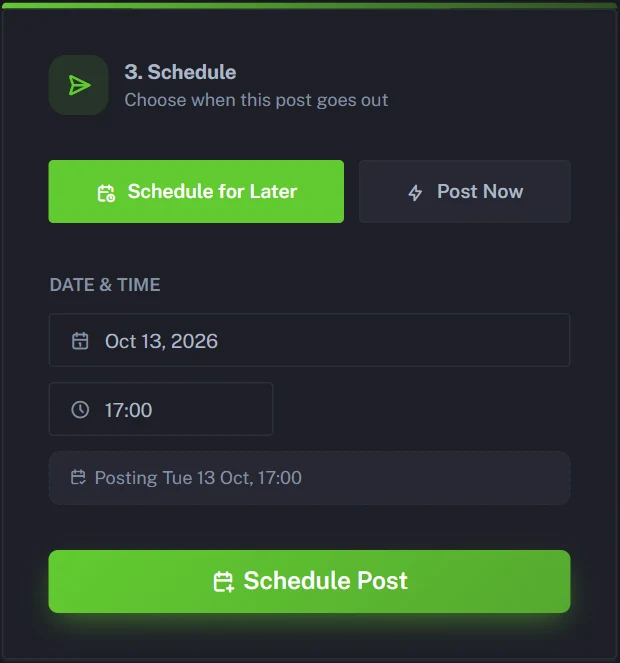
- In Step 3, choose Schedule for Later, pick the date and time in your browser's time zone, then click Schedule Post.
A photo publishes as a feed post and a video as a Reel. PostAnything doesn't post carousels or Stories. Media is resized automatically: square for the Instagram feed and vertical for TikTok and Reels, while YouTube keeps the video's shape (a vertical clip becomes a Short, a landscape one a regular video).
One post goes to all its switched-on platforms at the same moment. Your best time on Instagram probably isn't your best time on LinkedIn, so to split them, click New Draft and make a second post with Instagram switched off. Each post counts as 1, however many platforms it goes to. Our guide to scheduling posts on LinkedIn covers that side.
With Instagram's own scheduler
Instagram has a free built-in scheduler for posts up to 30 days ahead. It's fine for the odd post, but it's Instagram only, one post at a time, and you still write every caption yourself. We cover the steps, and where it stops, in our guide to automating Instagram posts.
Line up a month on your best days with Bulk Schedule (Pro)
On the Pro plan, you get 300 posts a month, and each one goes out to every platform you've connected. Bulk Schedule lets you fill a month in one sitting, and the free trial includes it so you can try it first.
- Open Bulk Schedule in the sidebar.
- Choose Generate from Media to upload photos or videos and get a caption for each, or Import CSV using the Download CSV Template.
- Choose Platforms for this batch, for example just Instagram.
- Optional Review and edit every row.
- Click Auto-fill blank times, then set a start date, a time of day and Specific weekdays, such as Tuesday, Wednesday and Thursday.
- Schedule the batch.
The takeaway
There's no single best time to post on Instagram, but the studies agree more than they first seem to. Post on weekdays, lean on Tuesday and Wednesday, and aim for lunchtime to early evening in your followers' time zone. Then check your own Most active times, test for a few weeks and keep what works.
When you're ready to stop setting alarms, start your free trial. You get 5 free posts, each one publishes to every platform you connect, and you don't need a credit card.
Start Free Trial